
A temporary fix that lasted decades
Passwords have been guarding secrets longer than computers have existed. The ancient Greeks used pass phrases to distinguish friendly soldiers from enemy ones — a challenge issued, a response expected, access granted or denied. The concept travelled through centuries and landed in the 1960s, when MIT’s Compatible Time-Sharing System introduced the first digital password. What started as a practical solution to a simple problem became the internet’s universal key.
For a while, it worked. Then it didn’t.
Decades of data breaches, credential stuffing attacks, and the uniquely human habit of reusing the same password across every account have exposed the fundamental flaw in the model. Passwords are a shared secret. You know it, the server knows it, and increasingly, so does everyone else.
This post is about what went wrong, and what’s taking passwords’ place.
Where it went wrong
Passwords are only as secure as the person who sets them. In my time as a Security Engineer I’ve seen the full range — the same password reused across every account, credentials scribbled on a sticky note and stuck to a laptop screen, and once, during an onboarding session, an employee who asked ChatGPT to generate their password. That knowledge now lives in OpenAI’s systems. I wish I was making that up.
The problem is that complex passwords are genuinely inconvenient. You’re late for a meeting, you need in fast, and nobody wants to type out a 14-character string with symbols and a capital letter in a specific place. So people don’t. They pick something simple, something memorable, and they reuse it everywhere.
Dictionary attacks work by running lists of commonly used passwords against login systems automatically — and those lists are better than you’d think. That password you set for your Myspace account in 2007? If you’re still using a variation of it today, there’s a reasonable chance it’s already on one of those lists. Passwords like 123456 or Summer2026! aren’t just weak — they’re predictable, and predictable is the same as broken.
What’s replacing them
Passkeys were built to solve the problem passwords created. If you want to understand one passwordless method in detail, I’ve already covered YubiKeys — worth reading alongside this.
A passkey is a cryptographic key stored locally on a trusted device — your phone, your laptop, a hardware token. There’s no shared secret, no password to steal, no server-side database full of credentials waiting to be breached. Authentication happens through something unique to you: your face, your fingerprint, or a PIN tied to that specific device. A bad actor can’t fake their way through that without physical access to you and your device at the same time.
They’re also easier to use than passwords. No remembering, no rotating, no complexity requirements. Your device handles the authentication — you just confirm it’s you.
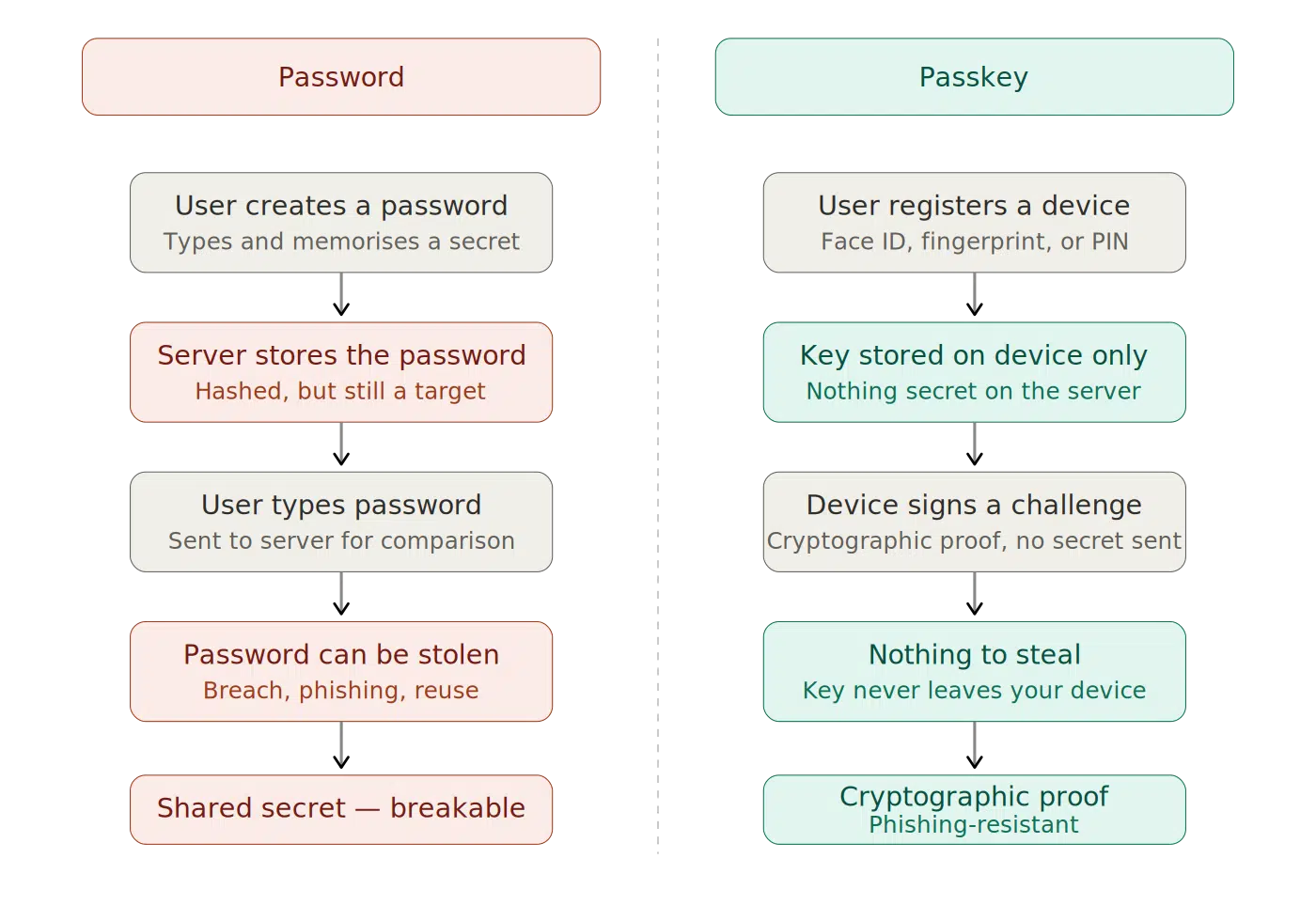
Password authentication relies on a shared secret. Passkeys don’t — there’s nothing on the server worth stealing.
Start getting comfortable with passkeys now. The industry is moving toward a passwordless future, and the pace of that shift is only going to accelerate as attacks get more sophisticated. That means thinking about how you build this into your organisation’s defences — not just your own accounts. Have the conversation with your stakeholders. Phishing-resistant authentication isn’t a nice-to-have anymore.
Want to go deeper on passwordless?
If this post raised questions about how passwordless authentication actually works in practice, the YubiKey and MFA posts are the natural next step.