
What is Security+?
CompTIA Security+ is a globally recognised certification that validates foundational cybersecurity skills and knowledge. It’s often described as the “baseline” certification for anyone looking to build or advance a career in information security.
The Security+ certification covers five core domains: general security concepts, threats and vulnerabilities, security architecture, security operations, and security program management. What makes it particularly valuable is its vendor-neutral approach — the skills you learn apply across any platform, technology, or security tool.
Chapter 1: Why Security+?
CompTIA Security+ had been lurking in the back of my mind for years throughout my IT career. Its name appeared everywhere I looked — the endless army of YouTube videos promising to help you pass, the CompTIA subreddit flooded with hundreds of posts asking “Is it worth it? Will I actually learn anything?” I’d even noticed it as a minimum requirement on job listings for entry level cybersecurity roles.
Having already earned my Network+ certification, Security+ felt like the natural next step in my progression. It wasn’t just about collecting certifications — it was about building something solid. The Security+ promised an opportunity to gain real confidence in the fundamental principles of cybersecurity. Its aim is to give you a foundation to build your cybersecurity house on top of, and if you want to break into a competitive field like this, you need that solid foundation underneath you.
Identifying My Knowledge Gaps
But there was a more personal reason driving me. I had specific gaps in my security knowledge that I couldn’t ignore. The basic principles of cybersecurity frameworks such as SOC 2 or NIST weren’t comfortable territory for me yet. While I could name popular attack vectors like phishing or brute forcing, SQL-based attacks remained a mystery — I couldn’t explain much about them or how to recognise them in the wild.
The reasons above became a pivotal moment of realisation that I had to take the Security+ SY0-701 exam.
The Security+ is very good at teaching you key foundational cybersecurity principles, but having the certification alone won’t make you an expert from day one.
Chapter 2: The Planning Phase
In order to get ready for the exam, I had to decide on the most important part — the timeline. Unlike my previous exam prep, I didn’t actually stick to a dedicated study timeline. I’d originally decided to start studying in May of 2025 and be exam-ready within four weeks. It wasn’t until July and August when I was able to knuckle down and discipline myself enough to go through the process and learn what I could.
Understanding the Exam Domains
I would always recommend downloading the exam objectives from CompTIA’s official website. Whilst the exam objectives won’t offer you a step-by-step tutorial on passing this cert, it covers the 5 domains that encompass the subject matter of the exam.
- Domain 1: General Security Concepts (12%)
- Domain 2: Threats, Vulnerabilities, and Mitigations (22%)
- Domain 3: Security Architecture (18%)
- Domain 4: Security Operations (28%)
- Domain 5: Security Program Management and Oversight (20%)
My commitments as a Security Analyst made it increasingly difficult to find time to sit down and do the work. Combine that with a hectic social life, and I had quite the hurdle to overcome.
You might make a plan to achieve a goal within a given timeframe, but it’s okay to stray from the original plan. Just make sure you stay consistent and lock in with your chosen study methods when you do get started. You can always make up for lost time.
Study Resources
I’d learned many lessons from my Network+ adventure and knew I could rely on proven study methods that had worked for me in the past. Professor Messer is famous for his free CompTIA YouTube certification courses, so I added his Security+ (SY0-701) playlist to my toolkit. Jason Dion also had a popular Security+ course on Udemy for the very reasonable price of £12.99 in the UK. Suddenly I had two powerful study resources which allowed me to create structure around my studying.
Building a Sustainable Schedule
My wife and I agreed: no study or personal projects on evenings or weekends. This left me with the option to study on the train for about 45 minutes, study during lunch breaks at work, or during quieter periods. I’ll admit to studying a few hours on a few evenings per week as exam day drew closer. Studying genuinely added purpose to not only my professional life, but also my personal life. It becomes addictive and even fun when you find a method that works for you.
Challenge for you
Try different study methods early: videos, note-taking, hands-on practice, flashcards. Through trial and error, you’ll quickly figure out what sticks. Once you find your approach, double down on it.
Chapter 3: The Study Process
First, I went through the entire free YouTube playlist of Professor Messer’s Security+ (SY0-701) course — 121 lessons downloaded directly to my local YouTube playlist. I’d listen to videos whilst walking to the train station to work for my morning commute, from my trusty ol’ reliable iPhone 11 Pro Max. This added a relaxed approach to studying and focused on passively taking the content in.
Professor Messer’s Free Security+ Course
Here’s the first video from the 121-video playlist I used for studying:
Comparing Course Formats
Once I finished that, I took the same approach with Jason Dion’s course. Whilst I appreciate Professor Messer’s course, Jason Dion became my preferred favourite. The Udemy course came with 29 lectures — I would aim to complete at least one daily. Doing the math, I should have been done in a little over a month, taking into account resting on weekends.
What I Already Knew
Throughout my studying, I realised there were some concepts I was already familiar with — security awareness (phishing training, anomalous behaviour recognition, user guidance) and mitigation techniques (segmentation, access control, hardening, isolation, patching) — largely because my role deals with improving security awareness programs by simulating real phishing attacks.
I’d also learnt about key security principles like Defense In Depth and Zero Trust from previous Microsoft certifications such as the SC-900, and cloud infrastructure from the AZ-900 and MS-900.
The Pain Points
The pain points became clear though — topics such as cryptographic solutions: public key infrastructure (PKI), encryption, obfuscation, hashing, digital signatures, and blockchain. Remembering cipher modes like ECB, CBC, and GCM. The certification’s breadth added to the challenges I had to overcome.
Chapter 4: The Final Push
At the very beginning of this post, I mentioned that I didn’t stick to a set timeframe for studying. The truth is, booking the exam in advance wasn’t something I did at the beginning of my journey. Instead, I booked it a week before taking it. Looking back, it’s hard to say if it was procrastination, hesitation, or a healthy dose of imposter syndrome that made me hold off for so long.
Practice Exam Results
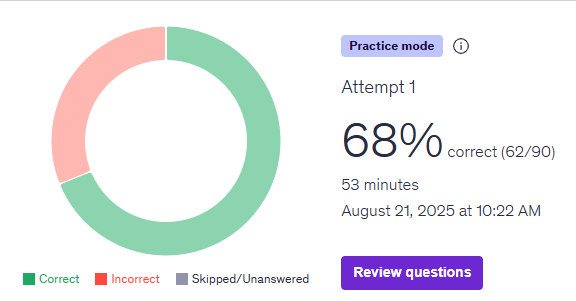
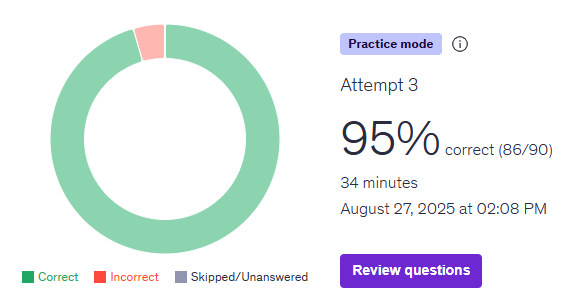
I wanted to be sure that I was scoring high in practice exams. Jason Dion’s practice tests became my benchmark for readiness. I took the same practice test three times to track my progression.
A reality check that showed I had work to do.
Progress was undeniable — feeling more confident!
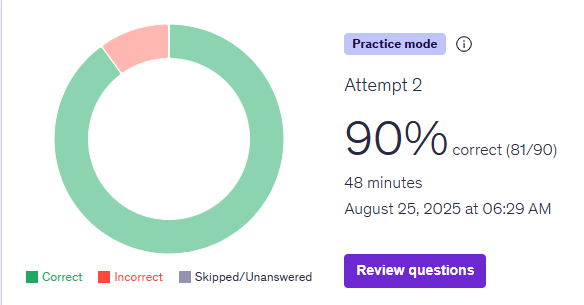
Magic! This delivered the message loud and clear — I was ready.
Choosing the Testing Method
A challenge I have always faced with IT certifications is whether to take them at home or at a testing site. The nearest testing site was well over 15 miles away and would amount to a disappointing car drive home if I were to fail.
I have always gone with Pearson VUE to test remotely at home — as long as you stick to their testing policies, you will be fine! If I had the option of a test centre I would take it, as they take overall responsibility for any technical hiccups during your testing experience.
Final Preparation
Because the exam was a matter of a couple of days away from when I booked it, my final study prep was light. I made sure to go through my practice exams again, but only a couple of times a day. I tried to relax as much as possible — half the battle with exams is mental, and if you don’t have a calm mind, that could affect your overall testing experience.
Leveraging ChatGPT as a study buddy was pivotal in my study approach. I used a prompt similar to this, which allowed ChatGPT to create tailored quizzes and evaluate my performance:
Chapter 5: Test Day
Out of respect for CompTIA’s exam confidentiality agreement, I’ll be keeping specific exam details vague. I won’t share actual questions, answers, or detailed scenarios. What I share here is my general exam experience and the types of question formats you can expect.
The day had finally arrived. I’d booked my Security+ exam for a Friday evening at 7:15 PM — right after work. Looking back, this timing was both a blessing and a curse. On one hand, I had the entire day to mentally prepare. On the other hand, I had to get through a full day of work knowing that in a few hours, months of preparation would be put to the test.
The Exam Begins
As soon as the exam loaded, reality hit hard. Right off the bat, I was presented with around 5 Performance-Based Questions (PBQs). My heart sank a little — these would be time-consuming and complex. Following advice I’d read countless times during my preparation, the strategic decision was made: skip them all and flag them for review. Coming back at the end would give me a better sense of my time remaining.
The Middle: Doubt and Recovery
I won’t lie — after flagging those PBQs, I felt nervous going into the multiple-choice questions. CompTIA has a reputation for wording their questions in ways that can throw you for a loop, and Security+ was no exception. But something interesting happened as I progressed. I started to gain confidence. The beauty of CompTIA exams is that they often revisit concepts from different angles, and I began recognising patterns. Cross-referencing gave me the confidence boost I desperately needed.
The Moment of Truth
I finished the multiple-choice section with around 13 minutes to spare — enough time to circle back to those dreaded PBQs. They involved drag-and-drop exercises for firewall configurations and a couple of command-line interface scenarios. I answered them to the best of my ability, drawing on both study material and practical experience as a Junior Security Analyst.
When I submitted that final answer, a wave of relief washed over me. CompTIA makes you answer post-exam survey questions before revealing your score — a mild form of torture when all you want to know is whether you’ve passed or failed.
I passed.
The feeling was incredibly rewarding. All those hours on the train, all those practice exams, all that dedication had paid off. Theory and practice had come together, and the result was sitting right there on my screen.
Chapter 6: The Aftermath
My final score was 774 out of 900. When I saw those numbers on the screen, the weight of months of preparation lifted instantly. I’d passed — and that’s all that mattered.
The first thing I did? Went out for beers with my wife to celebrate. She’d put up with me studying on train rides, watching videos during lunch breaks, and occasionally breaking our “no evenings” rule when exam day drew closer. The best part? We even got a beer on the house when I mentioned why we were celebrating. Small victories!
What It All Means
Earning Security+ has allowed me to see what’s possible within cybersecurity. Setting a goal, planning an approach, and achieving it — that’s what made cybersecurity more accessible to me in the process. The certification has given me a confidence boost because I now know I understand the fundamentals across all five domains. When conversations at work turn to security controls, threat mitigation, or compliance frameworks, I’m no longer second-guessing myself.
Career Impact (So Far)
To be completely honest, I haven’t seen dramatic career changes yet. I did get a call from a recruiter shortly after passing, which was encouraging. But more importantly, the confidence I’ve gained in understanding security fundamentals has been invaluable in my current role. These certifications are long-term investments — they open doors gradually, not overnight.
What I’d Do Differently
If I could go back and do it all again? I would have bit the bullet and booked the exam on day one. Having a clear deadline from the start would have given me better structure and motivation. That sense of urgency can be incredibly helpful for maintaining momentum.
The Security+ journey taught me more than just cybersecurity concepts. It reinforced the importance of consistency, realistic goal-setting, and finding study methods that work for you — not what everyone else says you should do. Are you working towards your Security+? Drop your thoughts in the comments or send me a message.
Bonus: Tips for Success
Before we wrap up, I wanted to share some concrete tips that would have made my journey smoother. These are lessons learned the hard way, and I hope they save you some stress along the way.
Study Phase Tips
This is the single most important piece of advice I can give you: book your exam as soon as you feel remotely ready. Without a firm date, it’s too easy to keep studying indefinitely, always feeling like you need “just a bit more time.” The deadline forces you to commit.
Don’t be afraid to break away from your usual study methods. Consider trying:
- Interactive flashcards for memorisation
- Treating study material like watching YouTube videos (my approach!)
- Getting hands-on — configuring firewall rules, running network commands
- Creating mind maps to visualise relationships between concepts
The best study method is the one that actually works for you, not what worked for someone else.
Don’t forget to get a good night’s rest the day before your exam. Eat well in the lead-up to test day. Your brain needs to be functioning at its best — don’t sacrifice these basics for last-minute cramming.
Exam Day Tips
Test at a test centre if you can and it’s accessible. If anything goes wrong at the test centre — technical issues, power problems, internet connectivity — it’s their responsibility, not yours. If you test at home and experience a power cut or internet outage, it’s on you and you may not be reimbursed.
If you encounter quite a few PBQs at the start of your exam, don’t panic. This is completely normal. Flag them for review and circle back once you’ve answered all the multiple-choice questions. This strategy helps you build confidence, understand what the exam is testing, and manage your time more effectively.
Don’t forget to breathe and try not to let the excitement and nerves get to you. If you think you’ve failed right from the start, you probably haven’t! CompTIA exams are designed to challenge you, and feeling uncertain is part of the process. Trust in your preparation.
A pass is a pass. The minimum is 750 on a scale of 100–900 — and that’s all you need. Don’t let imposter syndrome diminish your achievement. You’ve got this.
Ready to start your Security+ journey?
Check out more certification guides on the blog, or get in touch if you have questions about the study process.